
QuickBooks to MySQL Integration for Easy Data Sync
QuickBooks to MySQL integration helps businesses move their accounting data from QuickBooks into a MySQL database. This makes it easier to use QuickBooks data for reporting, analysis, and other business systems.
With this utility, you can connect QuickBooks to MySQL and keep your data updated. A free demo download is available, so you can test the integration before using it in your live environment.
What Is QuickBooks to MySQL Integration
QuickBooks to MySQL integration allows your QuickBooks data to be stored in a MySQL database. Instead of working only inside QuickBooks, your data becomes available in MySQL for better access and control.
The utility also supports MySQL to QuickBooks data flow, allowing selected data to move back into QuickBooks when needed. This helps businesses keep systems aligned without manual data entry.
How It Works
This QuickBooks to MySQL utility lets you export complete data from QuickBooks into a MySQL database.You can schedule the sync to update new data at set intervals automatically.
The utility runs in the background like a service and stays in the Windows system tray, where you can open it to manage sync settings, set time intervals, and view logs
How to Connect QuickBooks to MySQL
Install the QuickBooks to MySQL integration utility on your system
Connect the utility to your QuickBooks company file
Enter your MySQL database details
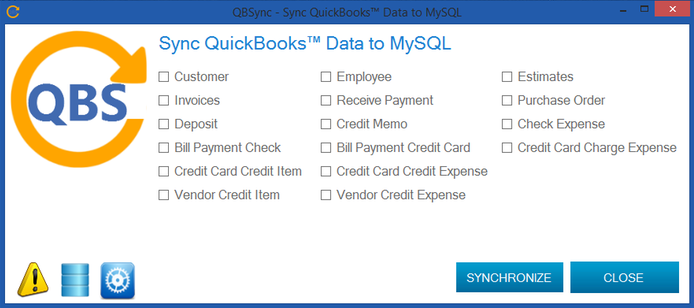
Select the data you want to sync
Set the sync schedule or run it manually
Monitor sync status and logs from the application
Benefits of QuickBooks Integration to MySQL
Using QuickBooks to MySQL integration helps businesses work with their accounting data more easily and efficiently.
Gives you direct access to QuickBooks data in a MySQL database
Makes reporting and data analysis faster and more flexible
Reduces manual data export and entry
Keeps data updated automatically on a schedule
Helps developers and teams use QuickBooks data in other systems
Supports better decision-making with accurate and organized data
This integration is useful for businesses that need more control and visibility over their QuickBooks data.
quickbooks to MySQL Faqs
Is technical knowledge required to use the integration?
No, the utility is designed to be easy to use. Basic setup options and simple controls make it suitable for both technical and non-technical users.
How do I connect QuickBooks to MySQL?
You can connect QuickBooks to MySQL by using an integration utility that links your QuickBooks data with a MySQL database. Once connected, you can choose what data to sync and set a schedule for automatic updates.
Can data be synced from MySQL to QuickBooks?
No, the data can only be synced from QuickBooks to MySQL without manual work.
Does this support QuickBooks SQL Server integration?
Yes, the utility also supports QuickBooks SQL Server integration, allowing you to connect QuickBooks to SQL Server databases in addition to MySQL.
Is a free demo available?
Yes, a free demo download is available so you can test the QuickBooks to MySQL integration before using it in your live environment. Contact our team for more details or a customized solution.